This post contains affiliate links. As an Amazon Associate I earn from qualifying purchases. I may also earn commissions from other affiliate programs at no extra cost to you. Please read full disclosure for more information.
Want to start a blog to sell digital products? You’re not alone. Many beginners want to start a blog, but overthinking gets in the way and they never do.
In this blog, I’ll explain in the simplest terms how to start a blog to promote your digital products. I’ll also cover some downsides you should be aware of.
Why Blogging Helps Your Digital Products
If you’ve read some of my other blogs, you know I’ve said this before: nowadays, the number of people who actually land on your blog might be smaller. But you still have to write.
Why? Because AI bots, like LLMs (large language models), read blogs too. If someone asks an AI about your type of business, it can cite you. And then the person might even check out your blog.
Or the AI can just make the person aware that a business like yours exists. They might not visit your site right away, but they’ll remember you. Think about it: if someone asks an AI, “What are the best digital product websites?” and your site shows up in the top 5 or 10…that’s huge.

Overall, writing blogs helps AI and Google learn about you. It builds your authority, even if humans don’t read every post (authority and trust are key ranking factors for search engines and LLMs). And as a bonus, your digital products get more exposure and more opportunities to be sold.
Steps to Start a Digital Products Blog
1. Pick a Platform
Since your goal is to promote digital products, your blogging strategy and platform matter a lot. If you want this blog to be serious and grow your business, I strongly recommend using WordPress.
Here is why. WordPress gives you all the features you will ever need. You can install plugins, run sponsorships, add ads, and have complete flexibility to make your blog work for you.
You can also try Blogger. I have a hobby blog there just for fun. It’s completely free, but in terms of writing, customizing your blog, and overall flexibility, WordPress is better. You can write on Squarespace or other platforms like Substack too.
But if you asked me, I would go with WordPress. As I told you before, I have a hobby blog, but this blog I take seriously. If I ever get sponsorship requests, want full flexibility on where to place ads, or plan to join good ad providers like Mediavine, I need to be on WordPress.
2. Hosting Your Blog
Once you have chosen WordPress, the next step is picking a host. I chose Bluehost and here is why. It is easy to set up, reliable, and affordable. You do not need to be a tech expert to get your blog online quickly.
Good hosting matters because it keeps your blog fast and secure. A slow blog can lose readers and hurt your credibility. Bluehost takes care of the technical stuff so you can focus on writing and promoting your digital products.

You can upgrade your plan as your blog and audience grow without any major headaches.
3. Legal Pages You Need
Before you start blogging, you need a few legal pages. These include Terms and Conditions, a Privacy Policy, and Disclaimers. They protect your blog and let your readers know the rules and how their information is used.
I got mine from a lawyer named Amira. She made very simple templates that show exactly where to insert your information. Each page takes less than five minutes to fill out, so all three pages should take no more than fifteen minutes. They are affordable, and once you have them, you just copy the text into separate WordPress pages and link them in your footer.
Remember, I am not a professional and this is not legal advice. I am just letting you know what is commonly needed for blogs.
Do not use free templates from random websites. They will not protect you or your blog. Use templates written by a real lawyer who knows what she is doing.
4. Cookies and Privacy Tools
If you are using a blog, you also need to handle cookies properly. Cookies are small files that track visitor behavior, and laws like GDPR and CCPA require you to inform your visitors and let them manage their consent.
I use Complianz Privacy Suite (GDPR/CCPA) Premium. The plugin adds cookie consent banners, manages privacy settings, and keeps your blog compliant. Once it is set up, it runs automatically, so you can focus on creating content.
5. Blog Design
When I first started with a WordPress blog, I was overwhelmed. I did not understand anything. It took me a month to set up a nice-looking website and learn everything I needed.
To save you time, I recommend watching these videos:
They explain how to get started, where to find free templates, and how to write your first blog. Following them can help you get your blog looking great much faster.
Nowadays, people really care about design. This is something you should not skip. A bad-looking site can turn visitors away.
And if you’re in the teacher/TPT space, having a set of styled stock photos for teacherpreneurs on hand makes it much easier to keep your blog covers, Pinterest graphics, and post images looking cohesive from day one.
While design is important, how you organize your pages matters even more for sales. Once your site is live, make sure you follow a good structure for your digital products blog so customers can actually find your buy buttons.
6. SEO Tips for Your Blog
I already have a few blogs about SEO on this site, but this is the one you really need to read: The very basics that are important for every beginner. It covers everything I’ve tested myself to get a digital product shop ranking on Google.
Here is a quick summary of what I use. On my WordPress site, I use the Yoast SEO plugin. It shows how many times to mention your target keyword. It lets you set a custom URL slug with keywords, SEO title, and meta description. It reminds you to add alt texts and to insert keywords naturally in them. The best part? It is free.

The other tool I use is Semrush. It has limited daily keyword searches, so do not waste them. Before writing each blog, I first talk with ChatGPT about my business. I ask which blogs I should write to boost authority. Then I go to Semrush and find keywords people actually search for under the SEO keyword overview section. This helps me write blogs that attract the right readers and grow my site’s authority.
7. Promote Your Blog
The days when you could just do SEO and your blog would rank are gone. It is much harder now to get visitors and sell online.
That is why you need to promote your blog.
The best platform for this is Pinterest. You can attach a link to a pin, which makes it easy to promote your blog. I do not know any other platform that lets you do this so directly.
So, use Pinterest as much as you can. Do not rely only on SEO because it can stop working at any time.
Downsides of Having a Blog
I knew this blog topic would really help beginners. But to be honest, it probably will not help me much if my only goal was to rank on Google. Why?
The way people search for information online has changed a lot. If you write blogs about “how to” topics (like i did just now), you will not get as many clicks anymore because of AI overviews. Not only that, but AI also uses your content to train its data.
That is why I recommend writing about commercial intent topics, not just informational ones. These kinds of blogs have fewer AI overviews, and people reading them are usually more ready to buy, even if there are fewer visitors overall.

Example:
Informational Blog Title Examples
These aim to teach, explain, or answer questions:
- “How to Start a Blog as a Beginner”
- “What Is SEO and Why Is It Important?”
- “How to Create a Digital Product Step-by-Step”
Commercial Blog Title Examples
These target buyers and often lead to higher conversions:
- “Top Digital Products That Boost Your Sales”
- “Best Platforms for Creating and Selling Digital Products”
- “Best Website Hosting Options for Selling Digital Products”
I will be honest, sometimes I really do not feel like writing. But I still do it because it matters. Still, I would never put all my focus on blogging alone, and I do not think you should either. Blogging should be just one part of your marketing strategy. The rest should be selling your products and promoting on social media. Relying only on a blog is too risky today.
Conclusion
Starting a blog to promote your digital products may seem overwhelming at first, but it is worth it. Using WordPress gives you the tools and flexibility to grow your blog, add legal pages, set up cookies, design a professional site, and optimize for SEO.
Remember, a blog is not just for humans. AI and Google read your content too, helping your business get noticed. Promoting your blog, especially on platforms like Pinterest, ensures more people see your digital products.

If you follow the steps in this guide and take action, you will have a blog that builds authority, attracts readers, and promotes your products. Start small, stay consistent, and learn as you go.
Keep this guide handy and take your first step today. 🙂
Love, Gabi. <3
Meet Your New Writing Buddy
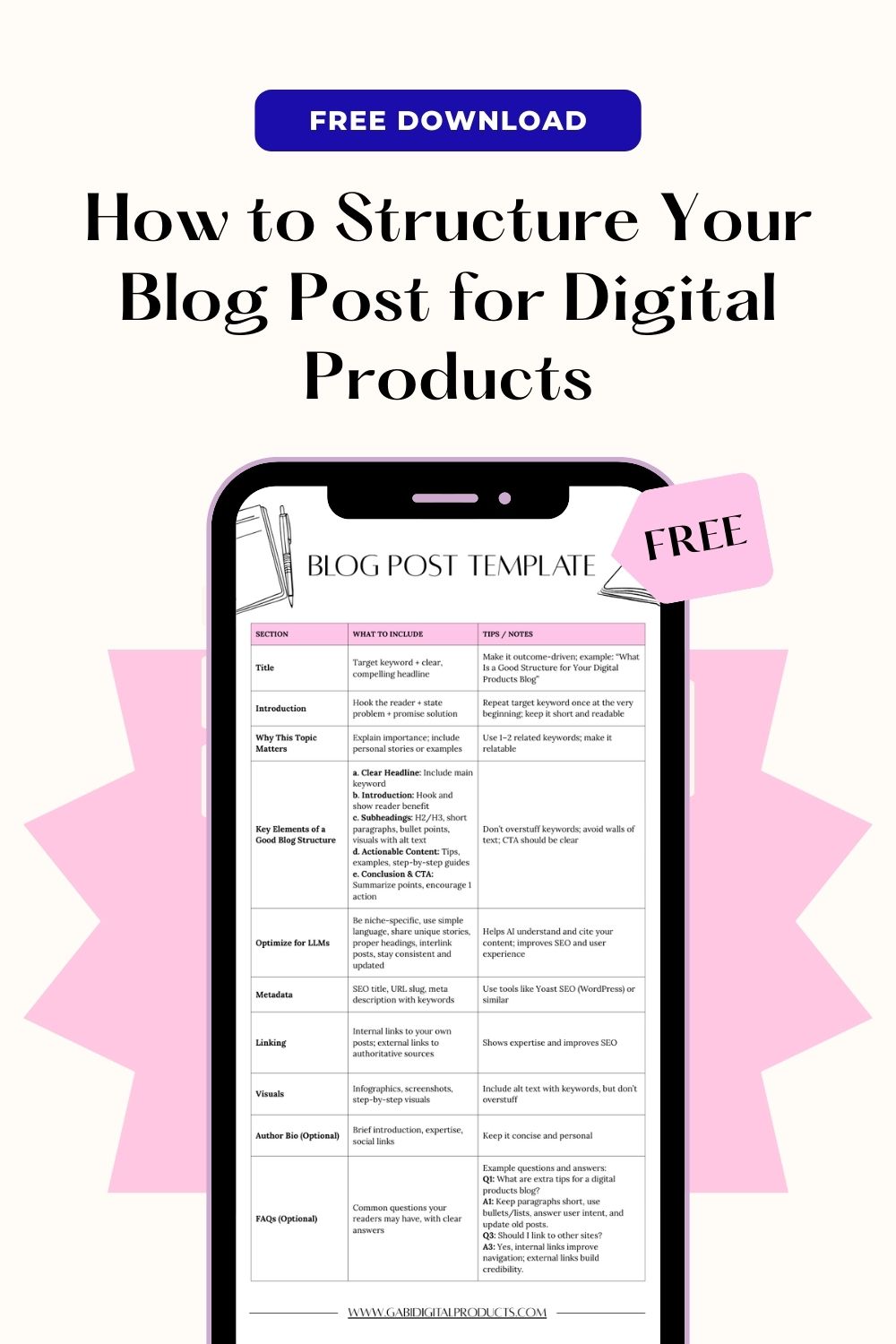
Grab this free template to structure your blog posts, rank on LLMs, and boost your digital product sales. It also includes MRR and PLR rights, just like everything else I give away or sell!
Until next time, Gabi. <3